SYSTEM_ Workflow Guide
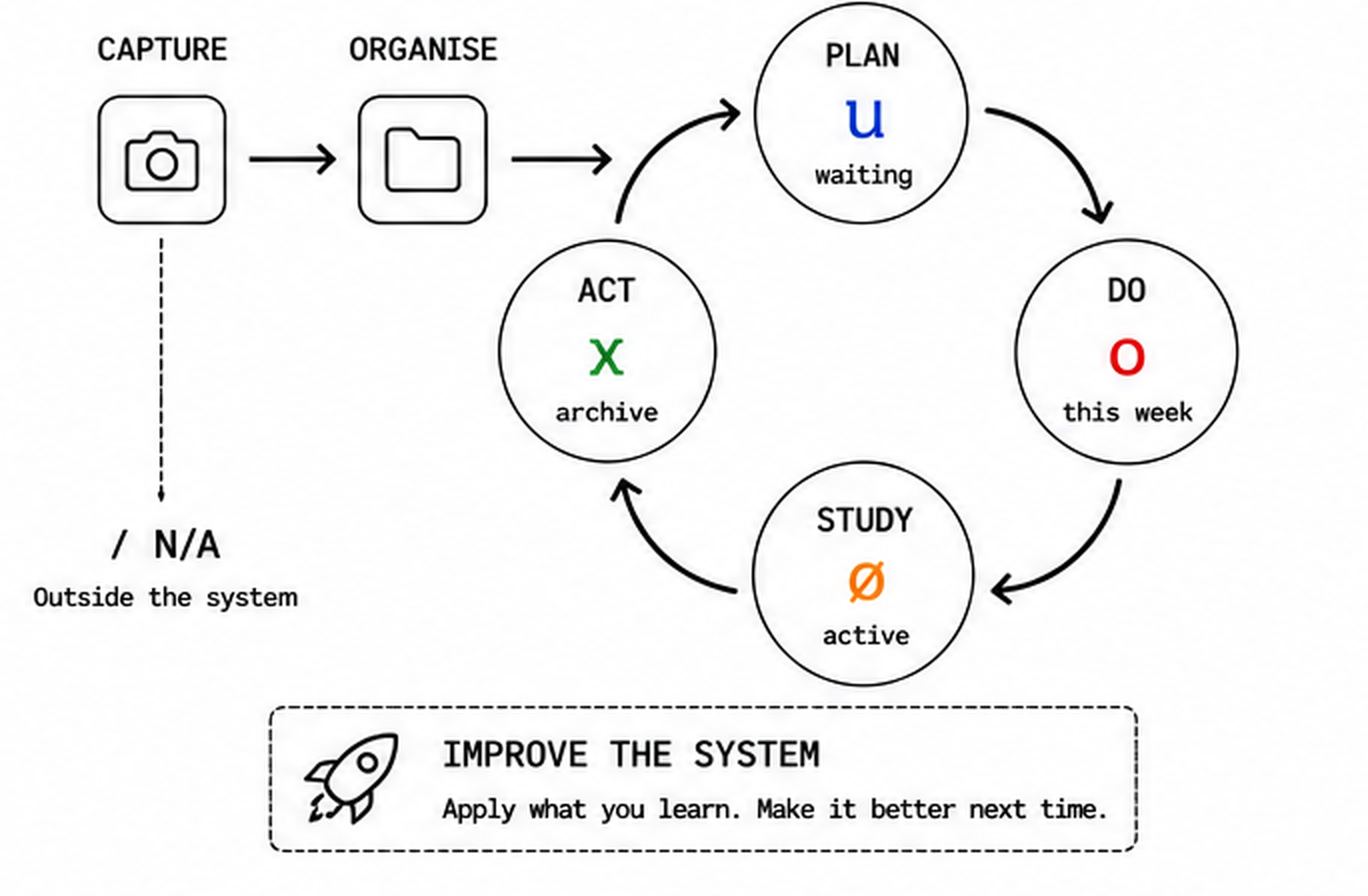
Workflow status and folders use the same system.
Workflow
| format | n/a | waiting | this week | active | archive |
|---|---|---|---|---|---|
| written | / | u | o | ø | ⊗ |
| typed | / | u | o | ø | x |
| folder | 00 n/a | 01 waiting | 02 this week | 03 active | 10 archive |
Written symbols are hand marks. Typed symbols are keyboard equivalents.
Operate
Capture once. Organise clearly. Review regularly. Improve continuously.
Workflow status and PDSA are closely aligned. As work moves through the PDSA cycle, its workflow status typically changes.
Naming
Lower case. Use spaces.
yyyymmdd domain brief description
20260722 system weekly review
Domain folders
Order follows a logic flow: system → plans → resources → life areas → archive.
Rename or add folders to suit your context.
- 01 system
- 02 plans
- 03 business
- 04 finance
- 05 health
- 06 family
- 07 recreation
- 08 other optional
- 09 other optional
- 10 archive
Archive
yyyy/domain
folder: 2026
subfolders: 01 system to 10 archive
2026/01 system/20260722 system weekly review
If the system needs more than 9 active folders, simplify the folders.